

Software problems are a common part of using computers, mobile devices, and digital systems. From apps crashing to slow performance and error messages, these issues can interrupt work and cause frustration. A clear and structured software troubleshooting guide helps users identify problems quickly and apply the right solutions without unnecessary stress.
This article explains common software issues, their causes, and practical steps to fix them in a simple and easy-to-follow way.
What Is a Software Troubleshooting Guide?
A software troubleshooting guide is a structured approach used to identify, diagnose, and resolve software-related problems. It helps users understand what went wrong, why it happened, and how to fix it efficiently.
Instead of guessing or randomly changing settings, a troubleshooting guide follows logical steps that save time and prevent further issues.
Why Software Troubleshooting Is Important
Using a proper software troubleshooting guide offers several benefits:
- Reduces downtime and productivity loss
- Prevents data corruption or system damage
- Helps users fix issues without technical support
- Improves overall software performance and stability
Understanding basic troubleshooting steps empowers users to handle common issues independently.
Common Software Problems Users Face
Before fixing issues, it’s important to recognize common software-related problems.
Software Not Opening or Crashing
Applications may fail to launch or crash unexpectedly due to corrupted files, outdated versions, or compatibility issues.
Slow Performance
Software may become slow because of insufficient system resources, background processes, or outdated software versions.
Error Messages
Pop-up errors often indicate missing files, permission problems, or system conflicts.
Freezing or Not Responding
Programs may freeze when overloaded or when system memory is insufficient.
Installation and Update Failures
Failed installations or updates are often caused by storage issues, interrupted downloads, or incompatible systems.
Step-by-Step Software Troubleshooting Guide
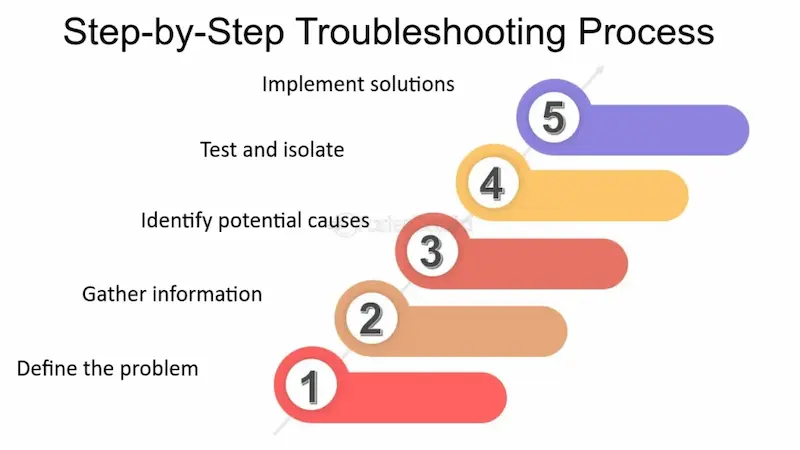
Step 1: Identify the Problem Clearly
Start by understanding exactly what is happening:
- When did the issue start?
- Does it happen every time or occasionally?
- Is it limited to one program or multiple applications?
Clear identification helps narrow down the cause.
Step 2: Restart the Software or Device
Restarting is one of the simplest and most effective troubleshooting steps. It clears temporary files, resets processes, and often resolves minor glitches.
Step 3: Check for Software Updates
Outdated software can cause compatibility and performance issues.
- Update the affected software
- Update your operating system
- Restart after updates
This step is essential in any software troubleshooting guide.
Step 4: Review System Requirements
Ensure your device meets the software’s minimum requirements, including:
- Operating system version
- RAM and storage space
- Processor compatibility
Insufficient system resources often lead to crashes and slowdowns.
Step 5: Check Internet Connectivity
Many applications require stable internet access. Weak or interrupted connections can cause syncing issues, login errors, and failed updates.
Step 6: Disable Conflicting Programs
Background applications may interfere with software performance. Temporarily disable unnecessary programs and check if the issue resolves.
Step 7: Clear Cache and Temporary Files
Cached data can become corrupted over time. Clearing cache and temporary files can improve performance and fix loading issues.
Step 8: Check Permissions and Security Settings
Security software or system permissions may block certain programs.
- Allow the software through firewall or antivirus
- Ensure proper access permissions
Misconfigured security settings are a common cause of software errors.
Step 9: Reinstall the Software
If issues persist, uninstall and reinstall the software:
- Remove the current version
- Restart the device
- Install the latest version
This step often fixes corrupted files or incomplete installations.
Step 10: Restore or Reset Settings
Some software allows resetting settings to default. This can resolve issues caused by incorrect configuration changes.
You may also like it:
Top Gadget Releases: Latest Tech Innovations You Should Know
How to Set Up PC: Complete Step-by-Step Beginner Guide
Beginner Tech Tutorials: Easy Guides to Learn Technology
DIY Tech Projects: Fun & Easy Projects for Beginners
Advanced Troubleshooting Techniques
For persistent issues, advanced steps may be required:
- Check system logs for error details
- Run built-in diagnostic tools
- Scan for malware or viruses
- Perform system file checks
These steps are useful when basic troubleshooting does not work.
Preventing Future Software Issues
Prevention is an important part of any software troubleshooting guide. You can reduce future problems by:
- Keeping software updated
- Avoiding untrusted downloads
- Maintaining sufficient storage space
- Using reliable security software
- Backing up important data regularly
Good maintenance habits improve long-term system performance.
When to Seek Professional Help
If problems persist after following this software troubleshooting guide, professional help may be necessary. Seek assistance when:
- Data is at risk
- System errors affect multiple programs
- Software is critical for business operations
Professional support can prevent further damage and data loss.
Benefits of Using a Structured Troubleshooting Approach
A step-by-step approach:
- Saves time
- Reduces frustration
- Improves problem-solving skills
- Helps users understand their systems better
Instead of panic, troubleshooting becomes a logical and manageable process.
Final Thoughts
Software issues are unavoidable, but they don’t have to be overwhelming. A clear and practical software troubleshooting guide helps users diagnose problems, apply effective solutions, and restore normal functionality quickly.
By understanding common issues, following systematic steps, and maintaining software properly, users can minimize disruptions and enjoy smoother digital experiences. Whether you’re a beginner or an experienced user, mastering basic troubleshooting skills is essential in today’s technology-driven world.
FAQs – Software Troubleshooting Guide
1. What is a software troubleshooting guide?
A software troubleshooting guide is a step-by-step process used to identify, diagnose, and resolve software-related issues such as crashes, errors, or slow performance.
2. Why is software troubleshooting important?
Software troubleshooting helps reduce downtime, prevent data loss, improve system performance, and fix problems without needing professional support.
3. What are the most common software problems?
Common issues include software crashes, slow performance, error messages, freezing programs, and failed installations or updates.
4. What is the first step in software troubleshooting?
The first step is clearly identifying the problem, including when it started and whether it affects one program or multiple applications.
5. Can restarting fix software issues?
Yes, restarting often resolves temporary glitches by clearing memory, stopping background processes, and resetting the system.